Your script in the notch
Pin your teleprompter directly under your MacBook camera. Read naturally while staying completely invisible in Zoom, OBS, and Loom.
Native teleprompter for Mac, iPhone, and iPad — with Smart Follow voice tracking, 100% offline local AI models, and zero-relink NLE exports. Free forever.
Built natively for your creator workflow
Most creators still choose between memorizing every line or glancing away from the lens. Dante pins your script right beneath the MacBook camera and follows your voice word for word — completely hidden from Zoom and OBS.
[B-ROLL: NOTCH CLOSEUP]Switch cleanly between MacBook Notch, Floating Glass, or External Mirror mode without losing your place.
Pinned directly beneath your MacBook camera so every sentence keeps natural eye contact — and stays completely invisible to Zoom, OBS, and Loom.
Streaming Smith–Waterman word alignment recovers naturally when you pause, ad-lib, or restart a line — running 100% offline with local GGUF speech models.
Finish a take and hand off clean rough-cut timelines, burned-in marker tables, and synchronized subtitles straight into Final Cut Pro, DaVinci Resolve, or Premiere.
Features
Most prompters stop at scrolling text. Dante follows your voice, catches retakes automatically, hides from screen capture, and exports clean timelines into your editor.
Pin your teleprompter directly under your MacBook camera. Read naturally while staying completely invisible in Zoom, OBS, and Loom.
Pause, ad-lib, or restart a line without touching the keyboard. Optional local GGUF models run 100% offline on Apple Silicon.
Export clean rough-cut timelines and subtitles straight to Final Cut Pro, DaVinci Resolve, and Premiere in one click.
Stumble mid-sentence, start over, and keep rolling. Dante tags retakes and stamps [B-ROLL] and chapter cues automatically.
See your clean-pass runtime, speaking pace, and retake timestamps the second you hit Stop — ready to export as a Handoff Pack.
Start OBS recording automatically on countdown, trigger cues via Stream Deck or foot pedal, and direct from any local browser.
Download benchmarked GGUF speech models directly on Mac. Zero cloud latency, zero API keys, and zero audio ever uploaded.
Real-time speech activity and WPM cadence feedback keep your delivery crisp and unhurried from hook to call-to-action.
For every creator
Whether you shoot 60-second vertical Shorts, 30-minute YouTube essays, podcasts, or live executive keynotes — Dante adapts in one tap.
Balanced focal width beneath the MacBook lens for natural 16:9 talking-head delivery.
Track scripts in your native language using on-device Apple Speech locales or multilingual local GGUF models on Mac.
Automate shoots with OBS WebSocket v5, direct talent from any browser on local Wi-Fi, or launch scripts via dante:// URLs.
Developer ID signed & Apple notarized
Every macOS release is signed with a Developer ID certificate, notarized by Apple, stapled, and verified via Gatekeeper before shipping.
Why you can trust it
Your scripts, microphone audio, and camera recordings stay on your own hardware. There is no account to create and no cloud server in the middle.
Dante for iPhone & iPad
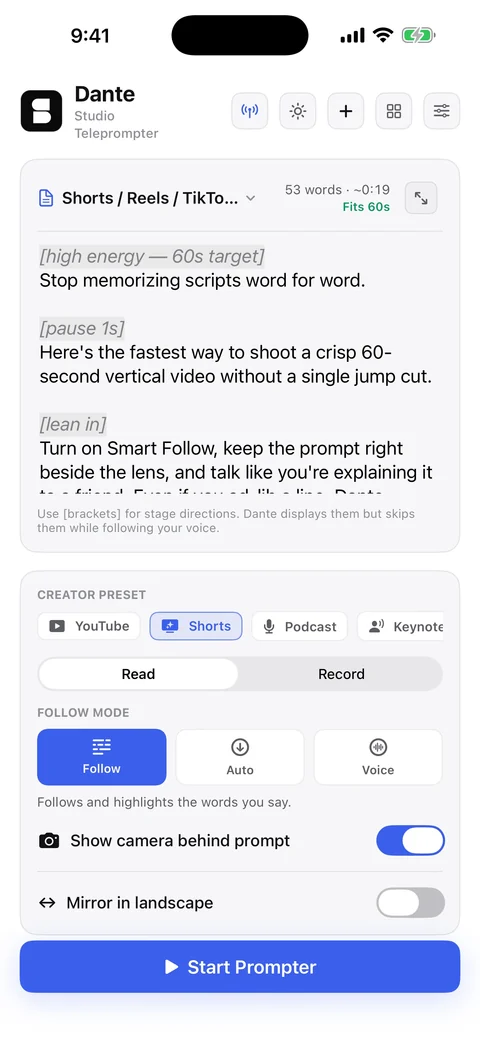
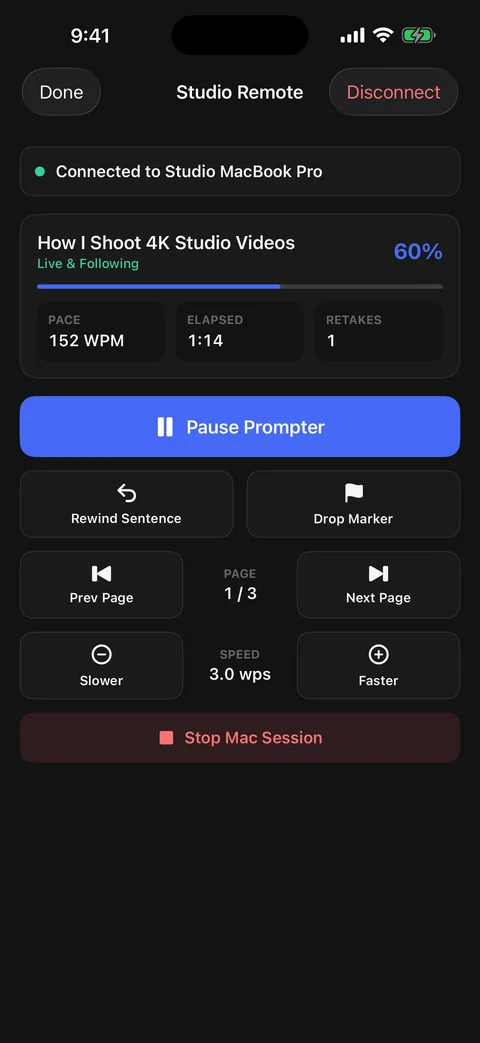
Film crisp vertical or horizontal takes anywhere with a presenter-only teleprompter positioned right beside the camera lens — or pair as a wireless remote for your Mac.
Works with iPhone, iPad & Mac Studio Remote
Engineered for Apple hardware
Follow every release, speech-tracking benchmark, and roadmap pillar openly on GitHub.
Pricing
No subscriptions, no watermarks, no accounts, and no locked pro features. Download Dante for Mac, iPhone, and iPad free and start filming in minutes.
Signed & notarized universal build for Apple Silicon and Intel Macs.
Presenter-only camera recording and pocket LAN studio remote.
Mac, iPhone, iPad, LAN Director Mode, and every future update — free.
Signed & Apple notarized·Zero telemetry & Privacy Policy·Free creator support
Hardware-tied companion utility, or a native macOS + iOS studio teleprompter.
Recurring cloud subscription, or 100% free native Apple apps with offline AI.
Legacy subscription teleprompter, or modern Apple Silicon studio workflow.
Something else? Write to support@playbookinteractivemedia.com and our team will help.
Yes. Dante for Mac, iPhone, and iPad is completely free with no watermarks, no time limits, no accounts, and no subscription paywalls blocking Smart Follow, offline AI models, or NLE exports.
Dante for Mac ships as a Developer ID signed and Apple notarized Universal binary supporting both Apple Silicon (M1/M2/M3/M4) and Intel Macs on macOS 15 Sequoia and later. The companion app supports iPhone and iPad on iOS/iPadOS 26+.
No. When you use offline local GGUF speech models on Mac or on-device Apple Speech, microphone audio and scripts stay 100% on your hardware. Dante has no backend servers collecting scripts, takes, or recordings.
No. On macOS, Dante configures its overlay window with NSWindow.SharingType.none so Zoom, OBS, Loom, and macOS screen recordings exclude the teleprompter automatically. On iPhone and iPad, presenter-only capture saves clean video to Photos without the script overlay.
Smart Follow runs a streaming Smith–Waterman alignment engine that waits calmly when you pause or improvise and snaps back the moment you rejoin the script. If you restart a sentence, Smart Retake detects the re-read and marks the clean pass automatically.
After any take, Dante’s Take Summary exports clean .FCPXML timelines, .EDL edit decision lists, word-timed .SRT/.VTT captions, and Studio Handoff Packs so editors jump straight to clean takes without scrubbing dead air.
Yes. Enable LAN Director Mode or Browser Remote on your Mac and open the local Wi-Fi URL from any iPad, iPhone, or producer’s browser to adjust pacing, jump pages, or edit lines live with zero cloud accounts.
Yes. Dante supports external display output with horizontal and vertical mirror modes, making it work seamlessly on the Elgato Prompter and standard beam-splitter glass rigs alongside OBS WebSocket v5 automation.
Signed with a Developer ID and notarized by Apple. 100% free — no account, watermark, or subscription required.
Looking for the mobile app? Explore Dante for iPhone & iPad or read the Creator Guide.
Need help? support@playbookinteractivemedia.com